Guide
Calendly Alternatives: Comparing Scheduling Links, and How to Screen Who Books Time With You

Summary of the Article
A booking link is the fastest way to let people grab time on your calendar — and also the fastest way to lose it. This article compares the main Calendly-style scheduling tools, explains where each one fits, and then covers the gap none of them solve: qualification. Anyone holding your link can book, whether or not they're worth the meeting.
- Calendly is the default choice: simple, widely recognized, easy for bookers.
- Cal.com and SavvyCal are strong alternatives for teams and for a more considerate booking experience respectively.
- Google Calendar appointment slots and Microsoft Bookings work well if you want scheduling inside the tools you already use.
- Acuity Scheduling, YouCanBook.me, and Chili Piper serve scheduling-heavy businesses, integrations-first users, and sales teams respectively.
- Every one of these tools shares the same weakness: the link qualifies nobody. At the end, we explain how Let's Not Have a Call sits in front of any of them, screening people before your real booking link is revealed.
The problem with a booking link that anyone can use
Scheduling links solved a real problem: the email ping-pong of "does Tuesday at 2 work?" One link, one click, one booked meeting.
The tradeoff is that the link has no judgment. It can't tell a genuine prospect from a mass-sent pitch, an outsourced SDR, or someone who wants thirty minutes of your time for something an email answer could have resolved. The more you share your link — in your email signature, your LinkedIn profile, your website — the more inbound you attract, and the less control you have over who claims your calendar.
So the market has two layers:
- Scheduling tools that make booking easy.
- Qualification — deciding who deserves to book at all.
Most comparisons only cover layer one. This one covers both, because layer one without layer two just makes it easier for the wrong people to reach you.
The Calendly-style options, compared
A quick comparison before the details:
| Tool | Best known for | Good fit when |
|---|---|---|
| Calendly | The default, widely recognized booking link | You want the simplest setup and a link everyone already understands |
| Cal.com | Open-source, developer-friendly scheduling | You want flexibility, self-hosting, or API-level control |
| SavvyCal | A considerate booking experience for recipients | Your bookers' time matters as much as yours; you want overlays and fewer back-and-forths |
| Google Calendar appointment slots | Scheduling inside Google Calendar itself | You live in Google Workspace and want zero extra tools |
| Microsoft Bookings | Scheduling inside Microsoft 365 | Your organization runs on Outlook and Teams |
| Acuity Scheduling | Client scheduling for service businesses | You take payments, packages, or appointments from clients |
| YouCanBook.me | Deep customization and integrations | Your booking page needs to match a specific workflow |
| Chili Piper | Instant lead routing and booking for sales teams | Inbound leads need to reach the right rep and book immediately |
Details below. Descriptions are based on how these vendors present themselves on their own sites; we haven't tested each one, and pricing and plans change, so confirm details on each vendor's page.
Calendly
Calendly is the name most people picture when they hear "booking link." Setup is minutes, bookers recognize the interface, and it covers the basics: event types, availability rules, buffers, reminders, and integrations with common calendars and CRMs. If you want the least friction for both sides, it's the safe default.
Its weakness is the same as everyone else's: a Calendly link is a door without a doorperson. Everyone who has it gets the same access.
Cal.com
Cal.com positions itself as open-source scheduling infrastructure. It appeals when you want more control than a hosted link provides — customization, self-hosting, and an API for building scheduling into your own product. If you're technical or want scheduling to be part of your stack rather than a separate tool, start here.
SavvyCal
SavvyCal focuses on the booker's experience. Its best-known idea is the overlay: the person booking sees their own availability against yours, which cuts down the back-and-forth when your slots don't work for them. It's a good match if you send your link to senior people whose time you're asking for, not just people asking for yours.
Google Calendar appointment slots
If you already run on Google Workspace, appointment slots in Google Calendar let you publish availability without adopting another product. It's the lowest-overhead option, but it's also the most limited: minimal customization, minimal workflow. Fine for simple availability; thin for anything structured.
Microsoft Bookings
Microsoft Bookings is the Microsoft 365 answer to the same problem — a booking page tied to your Outlook availability, aimed at businesses taking client appointments. If your organization is Outlook-and-Teams native, it avoids adding yet another subscription and calendar sync.
Acuity Scheduling
Acuity Scheduling is built for service businesses: appointments, packages, and payments in one flow. If the "meeting" is actually a paid session — coaching, consulting, client work — Acuity is closer to what you need than a pure internal-meeting scheduler.
YouCanBook.me
YouCanBook.me competes on customization: booking pages shaped around your workflow, with questions, notifications, and integrations configured in detail. Choose it when the standard booking form isn't enough and you're willing to spend setup time getting the page exactly right.
Chili Piper
Chili Piper is the sales-team entry. It focuses on converting inbound interest into booked meetings instantly — routing form fills to the right rep and getting a meeting on the calendar while interest is hot. It's a revenue-operations tool, not a personal scheduling link, and it's priced accordingly.
How to choose between them
Four questions narrow the field fast:
- Where do your bookers live? Google Workspace points toward Google's native option or Calendly; Microsoft 365 toward Bookings; technical teams toward Cal.com.
- Who's booking? Clients paying for sessions suggest Acuity; peers and prospects suggest Calendly or SavvyCal; inbound leads at volume suggest Chili Piper.
- How much customization do you actually need? If a standard form is fine, don't pay the setup cost for YouCanBook.me-style depth.
- Is a meeting always the right outcome? If your calendar is filling with meetings that shouldn't have happened, no scheduling tool fixes that — that's a qualification problem, which is the next section.
The gap in every option above: they qualify nobody
Notice what all eight tools have in common: the moment someone clicks your link, the meeting is essentially theirs. There's no step where the tool asks what you'd want asked, checks the answer against your standards, or declines on your behalf.
That's fine when bookings come from people you already trust. It breaks down when the link is public — because public links get found by pitch senders, and pitch senders optimize for booking, not for being worth your time. You end up with a beautifully efficient calendar full of calls you regret.
The fix isn't a better scheduler. It's a screen in front of the scheduler.
How Let's Not Have a Call works with any of the tools above
Let's Not Have a Call (LNHAC) isn't a Calendly competitor — it's a layer that works with your existing booking link, whether that's Calendly, Google Calendar, or any of the other options in this list.
The flow works like this:
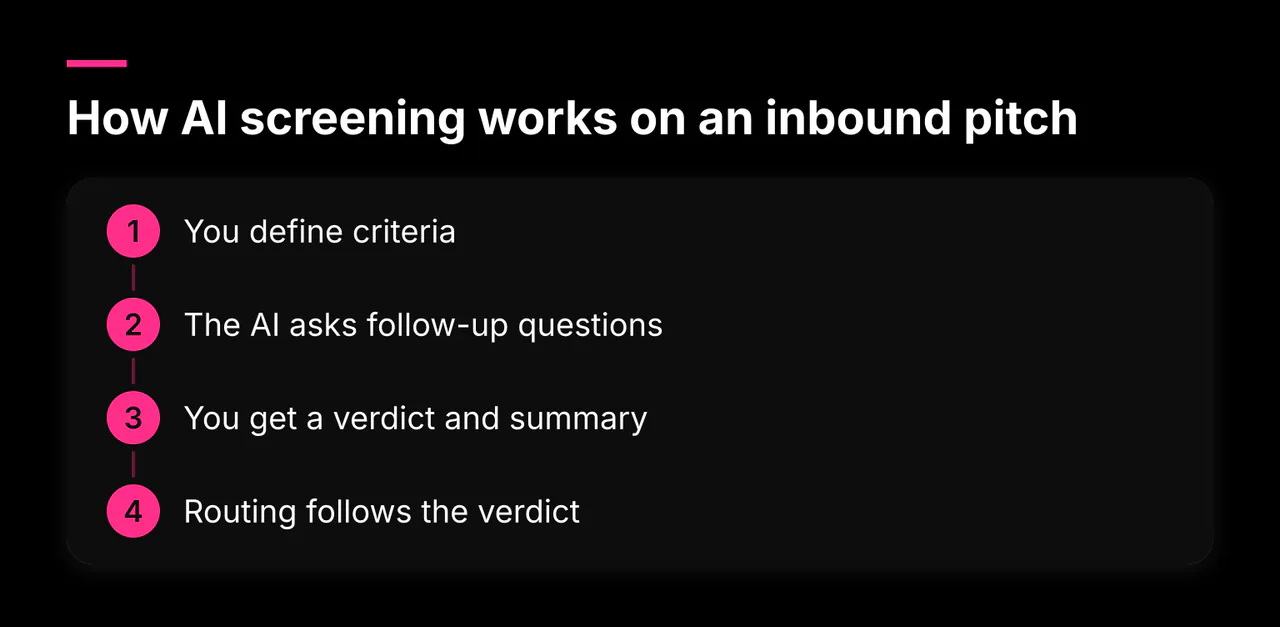
- You give LNHAC your real booking link. Calendly, Google Calendar, Cal.com, SavvyCal — whatever you already use.
- You share your LNHAC link instead. That link goes in your email signature, LinkedIn profile, and website in place of the raw booking link.
- People start booking, and the screen kicks in. Rather than handing over your calendar immediately, LNHAC asks follow-up questions based on criteria you've defined: what they're offering, why you specifically, what proof they have, what they actually want from you.
- Only people who meet your bar get the real link. Qualified senders are passed through to your actual Calendly (or Google, or Cal.com) page and book normally. Everyone else gets a courteous decline instead of a slot on your calendar.
The practical effect: you keep the convenience of a scheduling link, but the link stops being a free-for-all. The scheduling tool does what it's good at — availability and booking mechanics — and LNHAC does what it's good at — judging whether this person deserves the slot.
What to ask before revealing your booking link
The screen is only as good as the questions behind it. Five cover almost every inbound pitch:
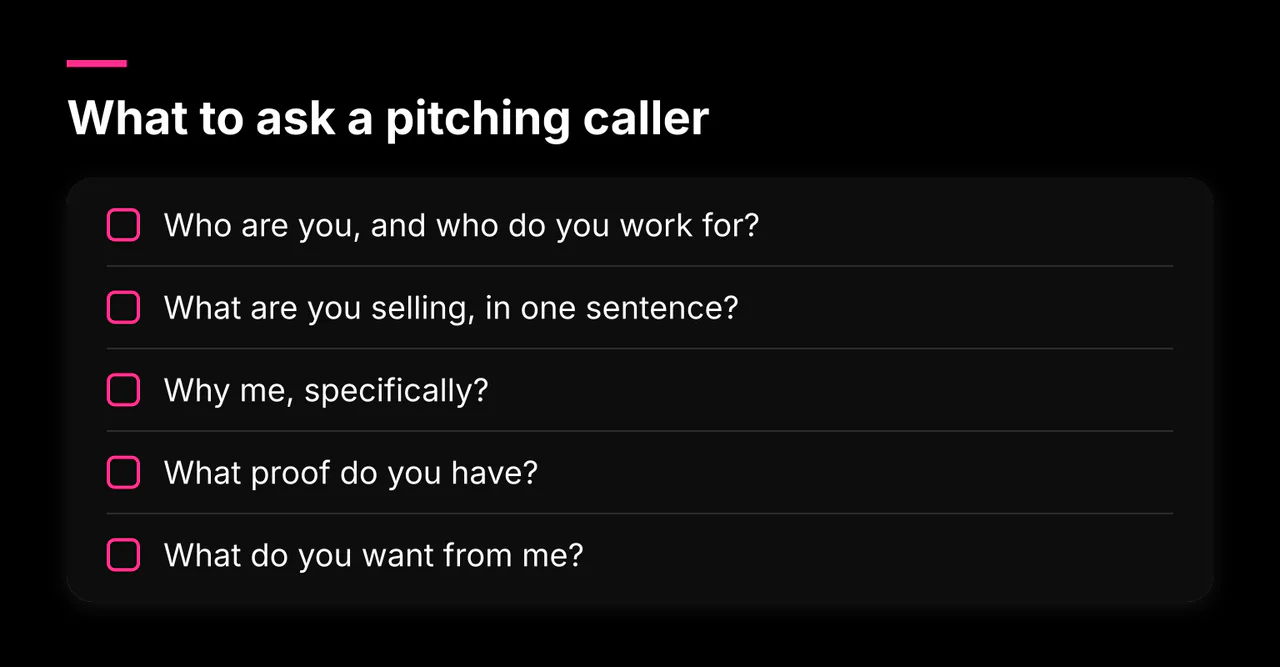
- Who are you, and who do you work for? Name, company, role. Filters out outsourced SDRs pretending to be founders.
- What are you selling, in one sentence? If they can't answer this, the rest doesn't matter.
- Why me, specifically? Did they research your role and company, or spray a list?
- What proof do you have? Customers, results, case studies, funding. Claims are cheap; specifics are not.
- What do you want from me? A demo? A partnership? A referral? Make them say it before they get a slot.
Turn those into four reusable criteria — fit, relevance, evidence of substance, and a realistic ask — and score every answer against them. A pitch that fails two or more is noise; a pitch that passes all four goes straight to your real booking link.
Limitations and tradeoffs, stated plainly
- Some good pitches get filtered. A criteria-based screen can pass over a rough, honest pitch and let a polished empty one through. Review the borderline verdicts yourself.
- Bookers notice the extra step. Genuine prospects who are used to one-click booking now answer a few questions first. Keep the questions short and explain why: people respect a screen that's clearly protecting your time.
- Two tools to maintain. You're now running a scheduler plus a screen. In practice the scheduler needs almost no attention once set up, but it's still one more moving part.
- Human override matters. A referral from someone you trust beats any score. Make sure the people who matter can always reach your real link directly.
The goal isn't fewer bookings. It's that the bookings you keep are the ones you'd have chosen yourself.
Next step
Pick your scheduler from the comparison above if you don't have one — Calendly for the simple default, Cal.com or SavvyCal if the options above don't fit your workflow. Then put a screen in front of it: you can sign up to create a screener at Let's Not Have a Call, connect your existing booking link, and share the LNHAC link publicly so only qualified people ever see your real availability. More guides on protecting your time from pitches and meetings are in our guides library, including how to stop Otter.ai, Fireflies and other AI notetakers from joining your meetings.